
Pruning
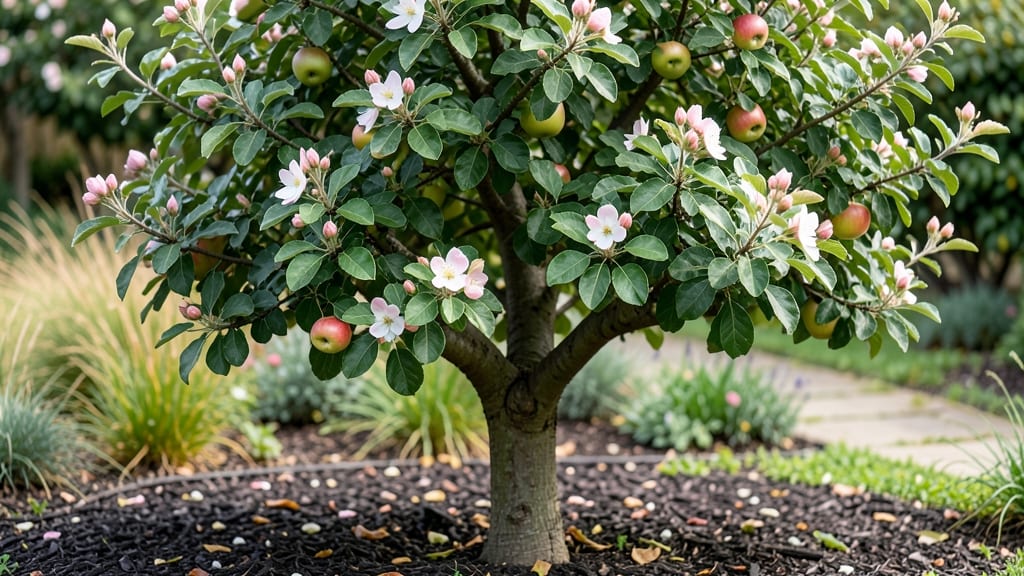
Watching an apple tree grow from a single seedling to a fruit-bearing giant is like witnessing nature’s slow-motion magic unfold. 🌱 This time-lapse journey reveals the hidden rhythms of growth—budding in spring, blossoms in early summer, and the first green apples forming by mid-season—each stage offering clues about what your tree truly needs to thrive.
The real secret? Pruning at the right moments. In late winter, you’ll shape the tree’s foundation; in summer, you’ll thin out crowded branches to let sunlight reach the center.
Without this timing, your tree might struggle with disease or poor fruit set—something I learned the hard way after skipping a winter prune and ending up with a tangled mess.
By the end of the year, you’ll recognize the subtle signs of maturity: stronger branches, thicker bark, and the first hints of fruit color. The time-lapse footage becomes your cheat sheet—showing exactly how fast (or slow) your tree is progressing and what adjustments to make next season.
Perfect for gardeners who love tracking progress or want to teach kids about patience and nature’s cycles. Here’s how to capture—and make the most of—every stage of growth.
📚 In This Guide
- What you need
- Instructions
- Tips and common mistakes
- Wrapping up and next steps
What you need
- ● DSLR or Mirrorless Camera: A mid-range model (e.g., Canon EOS Rebel T7i or Sony Alpha A6000) with manual settings for consistency.
- ● Wide-Angle Lens (16-35mm): Captures the full tree without distortion—essential for seasonal comparisons.
- ● Tripod: Sturdy (minimum 66" height) with a ball head for precise adjustments between shots.
- ● Remote Shutter Release: Avoids camera shake during long exposures (e.g., 2-second timer or Bluetooth remote).
- ● Memory Cards (32GB+): Fast write speed (UHS-I/UHS-II) to handle high-res shots (12MP+). Pro tip: 💡 Use two cards as backup!
- ● Healthy Apple Tree: Choose a young (consistent growth patterns (e.g., 'Honeycrisp' or 'Fuji' varieties).
- ● Unobstructed View: Clear 10-foot radius around the tree for seasonal light changes (no overhanging branches or buildings).
- ● Weatherproof Markers: 4–6 stake flags (e.g., bamboo or plastic) to mark the exact same frame for each shot.
- ● Time-Lapse Intervalometer: Program your camera (or use an app like Lapse It! or IntervalTimer) for bi-weekly shots (every 2 weeks).
- ● Editing Software: Free: Shotcut or OpenShot (for basic stitching).
- ● Paid: Adobe Premiere Pro or Final Cut Pro (for advanced effects).
- ● Cloud Backup: Google Drive or Dropbox (1TB+ recommended for raw files).
- ● ND Filters: For consistent exposure in varying light (e.g., 3-stop ND filter for bright days).
- ● GPS Tagging: Log coordinates (e.g., Garmin inReach) to revisit the exact spot annually.
- ● Drone (for wide shots): DJI Mini 2 SE (under 249g) with obstacle avoidance for aerial perspectives.
- ● Weather Alert App: Weather Underground to schedule shoots during clear, calm days.
Step-by-step guide to observing an apple tree's yearly growth
Here's how to track every major stage of an apple tree's life cycle in one year.
🌱 Step 1: Identify Early Spring Bud Break
Start watching in late winter/early spring when days lengthen and temperatures rise above 40°F. You'll notice small, swollen buds along the branches—these are your first clue the tree is waking up. Each bud contains a flower or leaf, and you'll see them swell noticeably within 2-3 weeks as sap begins to flow.
Use a 10x hand lens to examine the buds closely. Healthy buds should feel firm and plump, not mushy or shriveled. This is the moment when the tree's energy shifts from dormancy to growth—miss it, and you'll have to wait another year to see this transformation.
☀️ Step 2: Document Flowering and Pollination
Once buds open into white or pink blossoms (typically 3-4 weeks after bud break), you're in the flowering stage. This usually happens when daytime temperatures reach 55-65°F consistently. Use a digital camera with macro mode to capture close-ups of individual flowers—notice how each has five petals and a central cluster of stamens.
Watch for honeybees and other pollinators visiting the flowers. Successful pollination occurs when pollen transfers from stamen to pistil, which you can verify by looking for tiny green fruitlets forming at the base of flowers 4-6 weeks later. If you see no fruitlets, your tree may need a compatible pollinator nearby.
🌿 Step 3: Monitor Fruit Development Through Summer
By late spring, the tiny fruitlets will grow rapidly into small apples during summer. Measure their growth weekly—healthy apples should increase in size by about ½ inch per week during peak growth. Use a ruler to record measurements in a notebook or digital app.
This is also when you'll notice thinning—some fruit may drop naturally due to competition for resources. If your tree is overloaded, you can manually thin to 6-8 inches apart between fruits to ensure larger, higher-quality apples. Watch for apple scab or codling moth damage (tiny holes or brown spots) and treat organically if needed.
⏰ Step 4: Track Fall Maturation and Harvest
As days shorten in late summer/early fall, apples will change color and texture. Use your fingers to gently press the fruit—ripe apples will give slightly when pressed near the stem. Check for sugar content by tasting one weekly; mature apples should taste sweeter and less tart.
Harvest at the peak of ripeness (usually September-October, depending on variety) by twisting the fruit gently until it separates cleanly from the branch. Store harvested apples in a cool, dark place (around 32-40°F) to extend their shelf life. Document the final yield by counting and weighing your harvest.
✂️ Step 5: Observe Winter Dormancy Preparation
In late fall, leaves will turn yellow/brown and drop, signaling the tree's transition to dormancy. Prune any dead, diseased, or crossing branches before winter sets in—this helps the tree conserve energy. Watch for bud formation on new growth, as these will develop into next year's flowers and leaves.
Take final notes on the tree's health, including any pests, diseases, or unusual growth patterns. Mulch around the base with 2-3 inches of organic mulch to protect roots from freezing temperatures. This dormant period is crucial—trees use it to recharge for another cycle of growth.
Tips & tricks for perfect apple tree time lapse photography
Here's what I've learned from tracking apple trees over the seasons—these tricks will help you capture every stage beautifully.
Timing is Everything: The 2-3 week window after temperatures rise above 40°F is your best shot for capturing bud break. I recommend checking daily once you hit that threshold—morning light brings out the best details in those swollen buds. Use a timer on your camera to capture consistent lighting throughout the day.
Equipment Upgrade: While a basic camera works, I've found that a macro lens makes all the difference for blossoms and fruit details. The five-petal structure of apple flowers becomes stunning under close-up. If you don't have one, set your camera to its highest zoom setting and use a tripod for steady shots of the delicate blossoms.
Seasonal Lighting Secret: The golden hour (just after sunrise or before sunset) during fall is perfect for harvest photos. The warm light enhances apple colors and creates beautiful shadows. For summer fruit shots, mid-morning light works best to avoid harsh shadows that can hide texture details.
Documentation Hack: Create a simple spreadsheet with columns for date, stage, weather conditions, and photo file names. I use this to track patterns—like how my tree's blossoms always appear when daytime temps hit 55°F consistently. This helps you predict and capture future growth stages more efficiently.
Pro Tips for Apple Tree Time Lapse
- Here's what I've learned from tracking apple trees over the seasons—these tricks will help you capture every stage beautifully.
- Timing is Everything: The 2-3 week window after temperatures rise above 40°F is your best shot for capturing bud break.
- Equipment Upgrade: While a basic camera works, I've found that a macro lens makes all the difference for blossoms and fruit details.
Frequently asked questions
about capturing an apple tree time lapse—plus tips to troubleshoot common hiccups and get the best results!How often should I take photos for a smooth time-lapse?
For a balanced apple tree time lapse, aim for photos every 3–7 days during active growth (spring/summer) and every 2–4 weeks in dormant seasons (fall/winter). Use an intervalometer (or smartphone app) to automate shots at consistent times (e.g., mid-morning) for natural lighting.
What’s the best time of day to photograph an apple tree?
Shoot during the golden hours—1–2 hours after sunrise or before sunset—for soft lighting and vibrant colors. Avoid midday sun (harsh shadows) or overcast days (flat lighting). Early morning also reduces wind, keeping branches still for crisp shots.
Can I use a phone instead of a DSLR for a time-lapse?
Modern smartphones with 4K video or high-res stills (e.g., iPhone, Google Pixel) work great. Use a tripod or stable surface and apps like ProCamera (iOS) or Time Lapse (Android) for automation. Just ensure good lighting and steady framing to avoid shaky footage.
Why do my apple tree photos look blurry or pixelated?
Blurry shots usually stem from camera shake, wind, or low light. Solutions:
- Use a tripod or rest your device on a sturdy surface.
- Shoot in higher resolution (even if cropped later).
- Enable image stabilization (built into most phones).
- Avoid zoom—move closer instead.
How do I edit a time-lapse to speed up growth stages?
Use free tools like iMovie (Mac/iOS), CapCut, or Adobe Premiere Rush to:
- Set a frame rate (e.g., 24–30 FPS for smooth playback).
- Adjust speed (e.g., 2x or 4x) to compress months into seconds.
- Add music or text overlays to highlight stages (e.g., “Bloom: April”).
Wrapping up and next steps
Watching an apple tree time lapse unfold over a year isn’t just mesmerizing—it’s a masterclass in patience and care!
From delicate buds to heavy harvests, every stage reminds us that growth takes time, but the rewards are worth it. 🍏✨ Whether you’re a seasoned gardener or just starting, your efforts make a difference.
Ready to see the magic for yourself? Grab your camera, set up that time-lapse, and let nature’s rhythm guide you. Who knows? Your next project might just become the star of a stunning seasonal transformation!